

scry-mame
Ask your AI client what an arcade game is doing, and it finds out: it stops the game, reads its memory and presses its controls.
Install · What you can ask · Demos · Reference

LineUp on its arcade board, played through this server: each shot is one input call, by the names MAME gives the controls.
| You ask | A coin is in. Read the game's Credits variable by its name. |
|---|---|
| Your client calls | read_memory(ref="Credits", length=2) |
| SCRY answers | {"ref": "Credits", "hex": "0300"} |
| Your client learns | Credits holds 3 |
scry-mame is an MCP server for MAME, the emulator of arcade boards and home computers. It gives your client a MAME held open at its debugger, so a question costs one call, not a boot.
Your client reads registers and memory by your program's own symbol names, sets breakpoints and watches, presses the machine's controls, and reads its screen and its graphics. Replies carry their evidence: a loaded state is read back, and a missed target says the game was still running.
The clip is the LineUp demo, which needs the game's own ROM set. Your first question needs only a ROM that is free to download.
Install
You need git, uv and a MAME built with its gdbstub and its
console plugin, on macOS or Windows.
$ git clone https://github.com/scry-mcp/scry-mame$ cd scry-mameAdd it to your client
Claude Code
Run this from the clone. --scope user makes the server available to you across all projects, and claude mcp list shows it.
$ claude mcp add --scope user mame -- uv run --directory "$PWD" scry-mameCodex
Run this from the clone. codex mcp list shows the server.
$ codex mcp add mame -- uv run --directory "$PWD" scry-mameClaude Desktop
In Settings, open the Developer tab and choose Edit Config, which opens claude_desktop_config.json; add this with the clone's absolute path. Then quit Claude Desktop completely and start it again.
{
  "mcpServers": {
    "mame": {
      "command": "uv",
      "args": ["run", "--directory", "/path/to/scry-mame", "scry-mame"]
    }
  }
}
Cursor
Put this in ~/.cursor/mcp.json to have the server everywhere, or in .cursor/mcp.json inside one project, with the clone's absolute path.
{
  "mcpServers": {
    "mame": {
      "type": "stdio",
      "command": "uv",
      "args": ["run", "--directory", "/path/to/scry-mame", "scry-mame"]
    }
  }
}
VS Code
Put this in .vscode/mcp.json in your workspace, with the clone's absolute path.
{
  "servers": {
    "mame": {
      "type": "stdio",
      "command": "uv",
      "args": ["run", "--directory", "/path/to/scry-mame", "scry-mame"]
    }
  }
}
Copilot CLI
Run this from the clone. copilot mcp list shows the server.
$ copilot mcp add mame -- uv run --directory "$PWD" scry-mameGemini CLI
Run this from the clone. --scope user keeps it in your own settings, and gemini mcp list shows it, disabled while the folder you are in is not trusted.
$ gemini mcp add --scope user mame uv run -- --directory "$PWD" scry-mameAntigravity
Put this in ~/.gemini/config/mcp_config.json for every workspace, or in .agents/mcp_config.json inside one, with the clone's absolute path.
{
  "mcpServers": {
    "mame": {
      "command": "uv",
      "args": ["run", "--directory", "/path/to/scry-mame", "scry-mame"]
    }
  }
}
Devin
Run this from the clone. --scope user keeps it in your own configuration, ~/.config/devin/mcp_config.json, and devin mcp list shows the server.
$ devin mcp add --scope user mame -- uv run --directory "$PWD" scry-mameAnother client
Any client that runs a local server over stdio starts this command, with the clone's absolute path.
$ uv run --directory /path/to/scry-mame scry-mameYour first question
It needs only a ROM mamedev.org gives away,
starfire.zip, in ~/roms:
Start
starfirefrom~/roms, checked against its first program ROM unzipped fromstarfire.zip, and show me the screen.
Your client calls start, which answers rom_check: OK with the game stopped at its first
instruction, and screen_view, which returns the picture.
What you can ask
- "What is in this register, this byte, this routine, right now?"
registers,read_memory,disassemble. With your symbol file loaded you sayPlayer1, not0x008400. - "Who writes this byte?"
watch_add. A watch stops the game on the instruction that changes the byte, and the reply names it. - "Where does the game keep its credits?"
scan. It narrows a range of memory to the bytes that changed the way the value did. - "Does this routine ever run?"
run_to,breakpoint_at. A run counts an address known to run beside your target, so "never" comes with evidence. - "What happens if I press this?"
input,screen_view,record. Press a control by MAME's own name, then look: a picture, or exactly N frames of video. - "Can you do that again tomorrow?"
perform,promote. A list of calls runs as one, and what a session learned is saved in your repository.
See it run
Each demo is a demo.py that makes the calls a model would and checks every answer. Each
picture is the screen that run ended on, linked to its guide, where it moves.
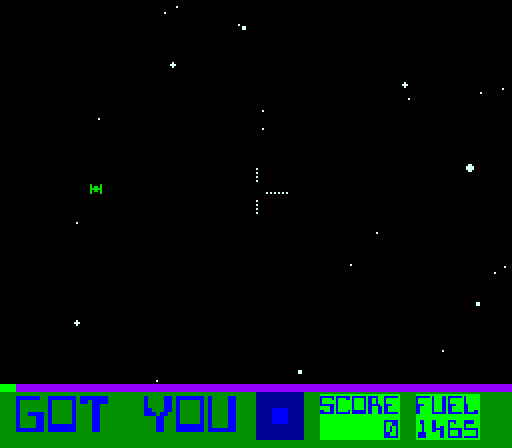
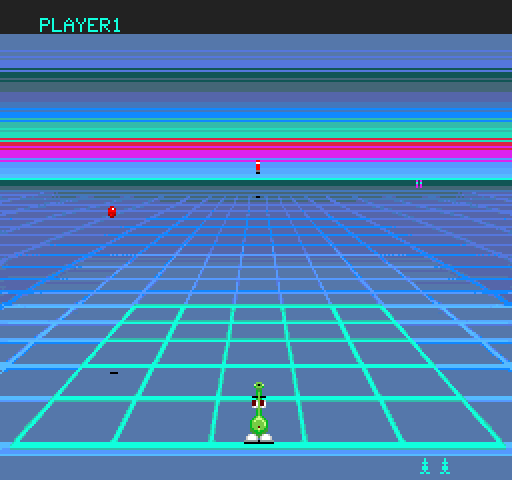

demos/starfire/: Exidy's Star Fire, a free ROM, from a cold start to the instruction that counts its coins.demos/gridlee/: Videa's Gridlee, a free ROM, whose credits turn out to live in two bytes, in binary and in BCD.demos/lineup/: the arcade LineUp, from the game's own ROM set, played by its own routine and variable names.demos/speedf/: the arcade Speed Fight, from a copy of the game, started from a file in its.scry/folder.
These are steps of the two demos on free ROMs, written here by the demos themselves from their last run. Each step follows the ones before it in its demo, whose guide has the whole prompt.
Star Fire
1. Find a variable nobody named
Ask:
Three coins are in. Keep only the bytes of the scan that hold 3 now.
Call:
scan(method="filter", operator="=", value=3)Reply, 3 of 12 fields:
{
  "summary": "scan filter: = 0x03, 1 left",
  "hits_total": 1,
  "hits": [
    {"addr": "0x00008299", "value": "0x03"}
  ]
}
One byte followed the coins from 1 to 3, so 0x8299 is the credits. "1 left" counts the bytes still in the scan.
2. Catch the instruction that writes it
Ask:
With a change watch on
0x8299, drop a fourth coin and tell me what wrote it.
Call:
input(port=":SYSTEM", field="Coin 1", frames=4, seconds=300)Reply, 3 of 42 fields:
{
  "summary": "input :SYSTEM 'Coin 1': still HELD from frame 284, releases at 288",
  "verdict": "OTHER_STOP",
  "cause": "watch 0x8299: 0x00008299 written by pc 0x00001e48"
}
OTHER_STOP means the watch stopped the machine while the coin was still held. cause names the byte and the instruction that wrote it, at 0x1e48.
3. Read how the program got there
Ask:
Show me the last eight instructions the CPU ran before that stop.
Call:
history(limit=8)Reply, 1 of 6 fields:
{
  "lines": [
    "1E3E: inc  (hl)",
    "1E3F: ld   a,(hl)",
    "1E40: cpl",
    "1E41: and  $03",
    "1E43: jr   z,$1E04",
    "1E45: ld   hl,$8299",
    "1E48: inc  (hl)",
    "1E49: ld   hl,$82AF"
  ]
}
history lists what the CPU ran up to the stop, oldest first. inc (hl) at 1E48 is the write the watch caught, and the line after it is where the game stopped.
4. Go back to before the coin
Ask:
Load the state you saved at four credits.
Call:
state_write(method="load", name="four_credits")Reply, 2 of 19 fields:
{
  "summary": "state_write load: four-credits, rom_check OK, verified True, ... (85 characters)",
  "verified": true
}
verified is true: the server read the machine back after the load, and it is the saved one. The fifth coin is undone.
Gridlee
1. Narrow a scan with each coin
Ask:
Three coins are in. Keep only the bytes of the scan that hold 3 now.
Call:
scan(method="filter", operator="=", value=3)Reply, 3 of 12 fields:
{
  "summary": "scan filter: = 0x03, 3 left",
  "hits_total": 3,
  "hits": [
    {"addr": "0x000003ee", "value": "0x03"},
    {"addr": "0x0000042b", "value": "0x03"},
    {"addr": "0x0000042c", "value": "0x03"}
  ]
}
Three bytes hold 3, and a scan cannot say which is the credits. "3 left" counts the bytes still in the scan; the watches of the next step tell them apart.
2. Let a watch name the writer
Ask:
Change watches are on
0x42band0x42cand a fourth coin is in. Run half a second and tell me what stopped it.
Call:
run_for(milliseconds=500, seconds=300)Reply, 3 of 23 fields:
{
  "summary": "run_for 500 ms: OTHER_STOP, frame 672 to 673",
  "verdict": "OTHER_STOP",
  "cause": "watch 0x42b: 0x0000042b written by pc 0x0000b583"
}
OTHER_STOP means a watch stopped the run before its half second ended. cause names the byte and the instruction that wrote it.
3. Read the routine it stopped in
Ask:
Disassemble 12 bytes from
0xb583, where the first watch stopped.
Call:
disassemble(ref="0xb583", length=12)Reply, 2 of 11 fields:
{
  "summary": "disassemble 0xb583: 5 lines at 0x0000b583",
  "lines": [
    "B583: 7C 04 2B INC    $042B",
    "B586: 86 01    LDA    #$01",
    "B588: BB 04 2C ADDA   $042C",
    "B58B: 19       DAA",
    "B58C: B7 04 2C STA    $042C"
  ]
}
The coin routine increments $042B, then adds one to $042C in BCD (ADDA, DAA, STA). The game keeps its credits twice, in binary and in BCD.
4. See what ran before a stop
Ask:
START was pressed and a watch stopped it. Show me the last eight instructions.
Call:
history(limit=8)Reply, 1 of 6 fields:
{
  "lines": [
    "D68D: RTS",
    "C5AD: JSR    $D676",
    "D676: DEC    $042B",
    "D679: LDA    #$99",
    "D67B: ADDA   $042C",
    "D67E: DAA",
    "D67F: STA    $042C",
    "D682: RTS"
  ]
}
history lists what the CPU ran up to the stop, oldest first. START takes a credit from both counters: DEC $042B, then the BCD one by adding 99.
Set up SCRY in your own project
Ask your client to start your own game with binary, system and rompath. To check the
ROM and use your own names for addresses, add reference_rom, reference_addr and symbols;
start's page says what each takes.
To keep what a session learned with your repository, ask it to promote what is worth keeping.
promote(dry_run=true, root=<your repository>) lists what it would create. Once you approve,
promote with entries and the same root creates a .scry/ folder with them; it writes
nothing before that.
scry-core's page on that folder says what is in it.
Platforms
macOS and Windows: the server and its tests run on both. Linux runs the unit tests
(.github/workflows/ci.yml) and nothing else.
startruns the MAME itsbinaryargument names, elseMAME_BINARY, else themameon yourPATH.- The server is tested on one MAME release, which
startnames inrecommended_release. Another release starts with anotesaying so. - A game on a NEC V20, V30 or V33 needs a MAME whose gdbstub serves their registers.
- Two patches under
patches/make a MAME better at this.0003closes a data race that can crash a start;0004gives each cpu its own GDB thread. - On Windows a MAME never outlives its server: it runs in a job object the server holds.
The tools
The tools by group, each with its arguments, its reply and a real example, are in the index at
the top of REFERENCE.md. Every reply opens with a one-line summary and ends
with a session block that says whether anything was written to the machine.
Going further
- REFERENCE.md has what the groups of tools share, and links each group's page.
- To watch a game run,
starttakesshared,displayandsize; its page covers a window nobody watches, one in front, and one watched from behind. - CONTRIBUTING.md is for changing the server: its checks, and what proves a change.
- What this server shares with scry-dosbox-x lives in scry-core, pinned by tag.
Licence
MIT. See LICENSE.
Credits
Developed by Optimiza (Marcos Hernández), in collaboration with MS-DOS Club and its podcast.