SCRYDOSBox-XDemosX-COM Apocalypse
X-COM Apocalypse: every file the game opens, read off its DOS calls
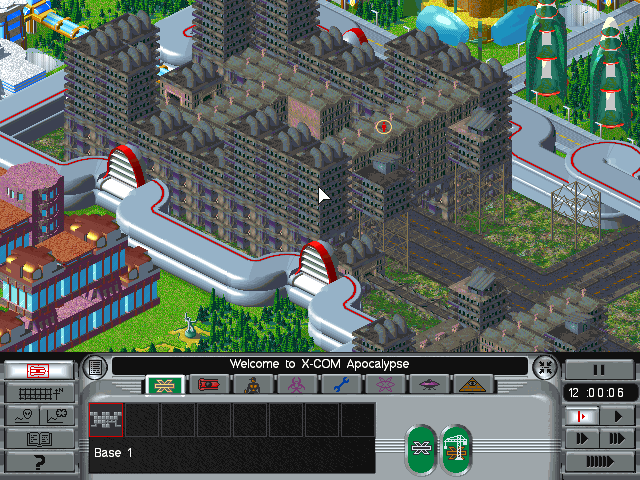
MicroProse's X-COM Apocalypse (1997) is a 32-bit DOS/4GW game that draws its menus and city in 640 x 480. This demo starts it with every INT 21h call recorded, skips the intro, starts a new campaign from the menus and films the city appearing. Then it lists the files the game looked for while it loaded: the game finds each file by its exact name before it opens it.
What you are watching
- The city of a new campaign, started from the menus, in 640 x 480.
The program
The game is commercial software, and nothing of it is in this repository. The demo runs it
from a directory you name, holding the game as its installer leaves it: XCOMA/ with the
program, and cd/X-COM Apocalypse.iso, the CD image.
It checks two files before anything starts and refuses another edition, naming its digest:
| file | sha256 |
|---|---|
XCOMA/XCOMAPOC.EXE |
123de1e6b94e0e75b01026820ba7528f63acd60acc62ad9b0793bf321187750e |
cd/X-COM Apocalypse.iso |
6acb86ee7447e94cdc94fe8a7d089045b77da5debd197445f3d50c4b5c98ea44 |
C: is your directory with an overlay over it in the run's own directory, so what the game writes (DOS/4GW's swap file, its options) never lands in your copy.
Run it
$ uv run python demos/xcom/demo.py --cwd /path/to/your/x-com-apocalypseEach line it prints is one call and its check. The window opens behind the others, so the run does not take your keyboard.
--cwd PATH(absolute or~-led) is your copy of the game.--binary PATH(absolute or~-led) picks the DOSBox-X to start. Left out, it isDOSBOX_X_BINARY, else thedosbox-xon yourPATH. The demo needs a build whose debugger records DOS calls (DOSTRACE) and reads the 640 x 480 screen (VGAMEMDUMP).--display Nopens the window on that display. Left out, it opens on the main one.--transcript PATHmoves the whole transcript; the run's other files go beside it.--update-readmerewrites this page's generated parts,TRANSCRIPT.md,screen.pngandloop.webp, from a run where every step passed. It needs ffmpeg andimg2webpon yourPATH.
Exit codes: 0 every step passed, 1 a step failed, 2 a usage error, 3 nothing was demonstrated. That last one is a directory without the game, another edition, a relative path or a server that did not start.
The conf runs the dynamic core at a fixed speed: the game needs the speed, and a fixed clock keeps two runs alike.
Try it yourself
Add the server to your client and open it in your copy of the game. Each of these is a step of the demo, in the order the demo makes them.
Start X-COM Apocalypse from my copy, recording every INT 21h call it makes.
start(shared=true, background=true, display="<host>", conf="<host>", cwd="<host>",
    program="XCOMAPOC.EXE", dos_calls=true, session_seconds=900, logfile="<host>",
captures_dir="<host>"){
"status": "ok",
"shared": true
}With dos_calls, the emulator writes each INT 21h call to a file of the session's; the log tool reads it back on the dos channel.
The whole reply
{
  "summary": "<volatile>",
  "status": "ok",
  "pid": "<volatile>",
  "conf": "./tmp/demos/xcom/xcom.conf",
  "conf_digest": "<volatile>",
  "watched": true,
  "bound_s": 900,
  "elapsed_s": "<volatile>",
  "captures": "off",
  "state_dir": "<volatile>",
  "shared": true,
  "ready_after_s": "<volatile>",
  "argv": "<volatile>",
  "binary": "<volatile>",
  "binary_origin": "<volatile>",
  "version": "<volatile>",
  "debugger_commands": ["A20", "BPIF", "CAPTURE", "DOSTRACE", "LOADSTATE", "MEMDUMPLIN", "PIC", "PORTINFO", "PRESENCE", "RUNSTATE", "SAVESTATE", "STEPIN", "TAP", "VGAMEMDUMP"],
  "stub": "./src/scry_dosbox_x/guest/SCRY.COM",
  "input_port": "<volatile>",
  "background": true,
  "presence": true,
  "window": "<volatile>",
  "logfile": "<volatile>",
  "dos_calls": "<volatile>",
  "declarations": {
    "rearm": {"rearmed": [], "stale": [], "unresolved": [], "ambiguous": [], "unarmable": []}
  },
  "note": "this session runs the dynamic core, which checks breakpoints only between compiled blocks, so a code breakpoint inside one can be passed over and a run that never reaches it proves nothing. Start on the normal core: `start(flags=[\"-set\", \"cpu core=normal\"])`",
  "kept": "<volatile>",
  "session": {"alive": true, "running": false, "altered": false}
}Wait until the main menu is on screen.
screen_wait(screen="main_menu", seconds=120){
"verdict": "TARGET",
"screen": {"name": "main_menu", "layer": "file"}
}The screen map knows the main menu by the signature of its Load Saved Game button; the wait runs the machine retrace by retrace until it is on screen.
The whole reply
{
  "summary": "<volatile>",
  "status": "ok",
  "verdict": "TARGET",
  "predicate": "screen",
  "already": "<volatile>",
  "waited_s": "<volatile>",
  "polls": "<volatile>",
  "sampled_every": "<volatile>",
  "screen": {"name": "main_menu", "layer": "file"},
  "session": {"alive": true, "running": false, "altered": false}
}Press Start Campaign Game.
send_mouse(target="start_campaign", action="down"){
"target": "start_campaign",
"screen": "main_menu",
"driver_arrived": true
}The map gives the button's place, so the press names the button, not the pixels it covers.
The whole reply
{
  "summary": "<volatile>",
  "status": "ok",
  "x": 318,
  "y": 186,
  "units": "screen",
  "button": "left",
  "action": "down",
  "route": "guest",
  "pointer": {
    "screen": {"x": 318, "y": 186, "width": 640, "height": 480},
    "mouse": {"x": 2548, "y": 1492, "max_x": 5120, "max_y": 3840},
    "buttons": ["left"],
    "bios_mode": "0x69",
    "vbe_mode": "0x101"
  },
  "driver_arrived": true,
  "polls": "<volatile>",
  "pc": "<volatile>",
  "cpu_mode": "<volatile>",
  "stop_seq": 19,
  "frame": "<volatile>",
  "instruction": "<volatile>",
  "regs": "<volatile>",
  "watches": [],
  "cause": "<volatile>",
  "e9": {"lines_total": "<volatile>", "truncated": false, "lines": [], "mark": "<volatile>"},
  "motion": true,
  "verify": {
    "checked": false,
    "why": "no `expect` was given, so the reply says what went into the guest and NOT that the program took it; pass expect=<E9 pattern> to confirm its reaction"
  },
  "target": "start_campaign",
  "screen": "main_menu",
  "identified_at_stop": 2,
  "session": {"alive": true, "running": false, "altered": false}
}Which files did the game look for with FindFirst while the campaign loaded?
log(channel="dos", pattern="find first", limit=400){
"summary": "log dos /find first/: 100 of 100 calls"
}The game opens each file through a FindFirst of its exact name, so the DOS channel lists every file it read, the CD's film and the city's map among them.
The whole reply
{
  "summary": "log dos /find first/: 100 of 100 calls",
  "status": "ok",
  "pattern": "find first",
  "channel": "dos",
  "lines_total": "<volatile>",
  "truncated": false,
  "calls": "<volatile>",
  "session": {"alive": true, "running": false, "altered": false}
}
The whole demo as one prompt
- Start DOSBox-X with
demos/xcom/xcom.conf, in my copy of the game, runningXCOMAPOC.EXEwith a window and every DOS call recorded. - Let it run, and on the DOS channel wait for it to look for
smk/intro1.smk; press Esc, wait forufodata/titles.pcx, press Esc, then wait forufodata/b-setup.pcxandsavegame/tactgame.09, the main menu and its last save slot. - Stop, load
xcom-screen-map.json, wait for the main menu on screen and press Start Campaign Game for half a second; wait for the difficulty menu and press Novice. - Let it run until it looks for
UFODATA/CITYMAP1.BLD, stop, and record 900 frames of the city. - List the FindFirst calls the game made, take a picture of the screen and close.
Tools this demo uses
| Group | Tools |
|---|---|
| Session | start, close |
| Run | resume, stop, run_for, screen_wait |
| Input | send_keys, send_mouse |
| Read | screen_map_write, screen_map_find |
| Machine | log, log_wait |
| Captures | record |
| Screen | screen_view |
Each group is a page of the reference. Some of the names need a word:
- Run: the tools that let the program run and stop it again.
- Machine: what the machine is and what it logged, the DOS calls among it when
startrecords them.
The transcript
TRANSCRIPT.md has every call of the run with its reply. The paths of your
copy read <host> there, because they are your computer's.
More demos
 Monkey IslandThe Secret of Monkey Island, with the lookout's lines written into the game's memory while it is stopped; it needs the disc.DOSBox-X
 LineUpThe arcade LineUp, from the game's own ROM set, played by its own routine and variable names.DOSBox-X · MAME
 Speed FightThe arcade Speed Fight, from a copy of the game, started from a file in its
.scry/folder.DOSBox-X · MAME BricksA breakout game this repository builds, stopped by name where each brick falls.DOSBox-X
 MinesweeperA Minesweeper this repository builds, its mines read out of memory and the board cleared without a miss.DOSBox-X
 Deluxe PaintDeluxe Paint II paints a sunset, and a scan finds the byte that holds its colour; it needs the program.DOSBox-X
 Deluxe Paint by its menusDeluxe Paint II driven through its menus and a dialog, each picked by name; it needs the program.DOSBox-X
 ReChip!ReChip!, a tracker driven by its keys and read by its own log; it needs a copy of the program.DOSBox-X