ReChip!: a tracker driven by its keys and read by its own log
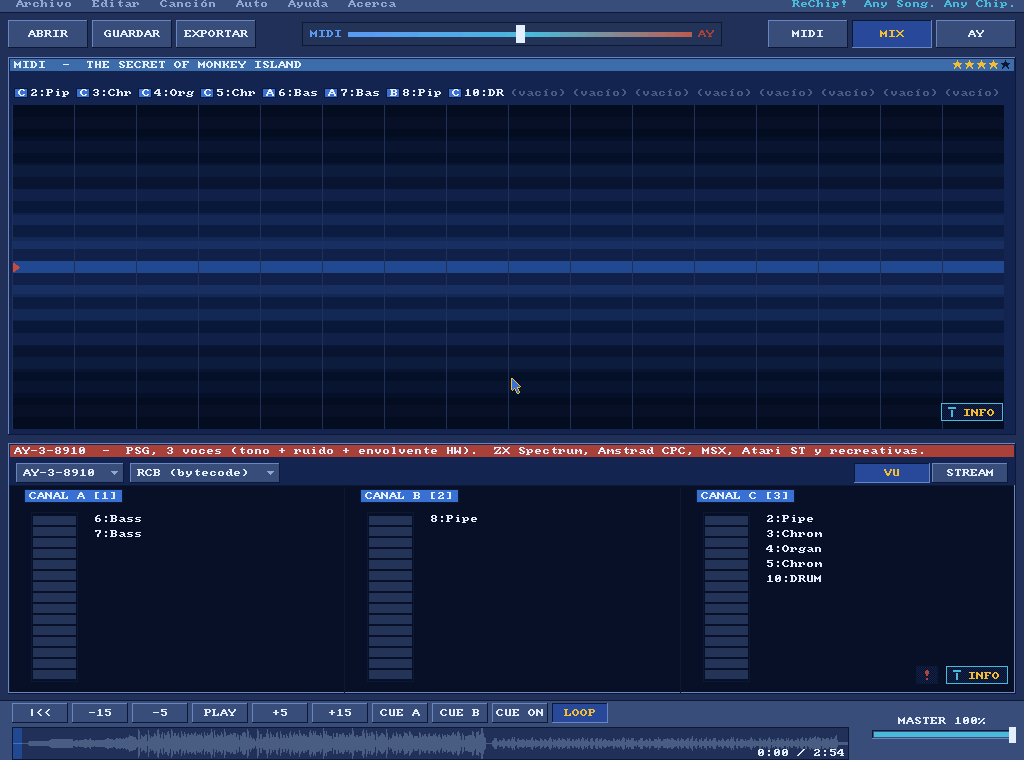
ReChip!, a 32-bit DOS program, converts music for vintage sound chips and plays it in a live
tracker. This demo starts it from a file in its .scry/ folder and waits for its log to say
the song is sounding. It pauses and rewinds the song with keys the program logs, films it
playing, and quits by its own dialog.
What you are watching
send_keyssets the song playing;stopholds the tracker andrecordfilms it playing on.
The program
ReChip! is not distributed with this repository. The demo needs a directory with the build
build/RECHIPD.EXE, its symbol table build/RECHIPD.SYM and the DOSBox-X conf build/mcp.conf.
Its .scry/start/dev.json is a start profile: a saved set of start arguments.
Run it
$ uv run python demos/rechip/demo.py --cwd /path/to/rechipEach line it prints is one call and its check. The window opens behind the others, so the run does not take your keyboard.
--cwd PATH(absolute or~-led) is the directory holding the program's build.--binary PATH(absolute or~-led) picks the DOSBox-X to start. Left out, it isDOSBOX_X_BINARY, else thedosbox-xon yourPATH.--display Nopens the window on that display. Left out, it opens on the main one.--transcript PATHmoves the whole transcript; the run's other files go beside it.--update-readmerewrites this page's generated parts,TRANSCRIPT.md,screen.pngandloop.webp, from a run where every step passed. It needs ffmpeg andimg2webpon yourPATH.
Exit codes: 0 every step passed, 1 a step failed, 2 a usage error, 3 nothing was demonstrated. That last one is a copy without its start profile or its build, a relative path or a server that did not start.
The picture is taken on an exact frame. The warning button pulses on the program's own counter, so the demo reads that counter and runs to the middle of the next lit half. It then stops on the first frame the button goes dark.
Try it yourself
Add the server to your client and open it in your copy of the program. Each of these is a step of the demo, in the order the demo makes them.
Wait until the program logs that the song is sounding.
log_wait(pattern="PERF \\. audio play=1", channel="guest", seconds=120){
"verdict": "TARGET",
"pattern": "PERF \\. audio play=1"
}TARGET means a line matching pattern arrived in the program's log. The program keeps running meanwhile: log_wait is one of the tools that answer while it runs.
The whole reply
{
  "summary": "<volatile>",
  "status": "ok",
  "verdict": "TARGET",
  "pattern": "PERF  \\. audio play=1",
  "channel": "guest",
  "line": "<volatile>",
  "already": "<volatile>",
  "lines_total": "<volatile>",
  "lines_before": "<volatile>",
  "arrived_during": "<volatile>",
  "waited_s": "<volatile>",
  "lines_examined": "<volatile>",
  "session": {"alive": true, "running": true, "altered": false}
}Press space and check that the program logged the key.
send_keys(keys=["space"], expect="key down SPACE", seconds=10){
"summary": "send_keys (guest): reaction seen",
"keys": ["space"]
}The program logs every key it takes, by name. "reaction seen" means that line arrived: the key reached the program, not only the emulator.
The whole reply
{
  "summary": "send_keys (guest): reaction seen",
  "status": "ok",
  "keys": ["space"],
  "modifiers": [],
  "route": "guest",
  "posted": 1,
  "bytes": 2,
  "frames": 2,
  "verify": {
    "checked": true,
    "seen": true,
    "expected": "key down SPACE",
    "verdict": "TARGET",
    "line": "<volatile>",
    "seen_before_waiting": "<volatile>",
    "lines_before": "<volatile>",
    "waited_s": "<volatile>",
    "lines_total": "<volatile>"
  },
  "session": {"alive": true, "running": true, "altered": false}
}Wait until the screen map names warning_dark.
screen_wait(screen="warning_dark", seconds=10){
"verdict": "TARGET",
"screen": {"name": "warning_dark", "layer": "file"}
}The warning button pulses on the program's own counter. TARGET means the wait stopped on the first frame the screen map, the file that names the program's screens, called warning_dark.
The whole reply
{
  "summary": "<volatile>",
  "status": "ok",
  "verdict": "TARGET",
  "predicate": "screen",
  "already": false,
  "waited_s": "<volatile>",
  "polls": "<volatile>",
  "sampled_every": 0,
  "screen": {"name": "warning_dark", "layer": "file"},
  "pc": "<volatile>",
  "cpu_mode": "<volatile>",
  "frame": "<volatile>",
  "regs": "<volatile>",
  "watches": [],
  "cause": "<volatile>",
  "e9": "<volatile>",
  "stop_seq": "<volatile>",
  "instruction": "<volatile>",
  "session": {"alive": true, "running": false, "altered": false}
}Answer the quit dialog: right arrow, then Enter.
send_keys(keys=["right", "enter"], expect="ask res=1", seconds=10){
"summary": "send_keys (guest): reaction seen",
"keys": ["right", "enter"]
}"reaction seen" means the program logged which button the dialog took. So the session closes over a program that quit by itself.
The whole reply
{
  "summary": "send_keys (guest): reaction seen",
  "status": "ok",
  "keys": ["right", "enter"],
  "modifiers": [],
  "route": "guest",
  "posted": 2,
  "bytes": 6,
  "frames": 6,
  "verify": {
    "checked": true,
    "seen": true,
    "expected": "ask res=1",
    "verdict": "TARGET",
    "line": "<volatile>",
    "seen_before_waiting": "<volatile>",
    "lines_before": "<volatile>",
    "waited_s": "<volatile>",
    "lines_total": "<volatile>"
  },
  "session": {"alive": true, "running": true, "altered": false}
}
The whole demo as one prompt
- Start from the start profile
.scry/start/dev.jsonof the copy, with a window, on the normal core, with the symbolsbuild/RECHIPD.SYM, and let it run. - Wait on the program's log for
PERF . audio play=1, press space and show me the program loggedkey down SPACE. - Wait for
ACT . play=0, press home and wait forACT . rewind. - Twice, wait for the next
PERF . fps=line written after the log's current end. - Stop inside the program and read the 4 bytes of
_g_ticks, its counter in 10 ms ticks. - Run to the middle of the next lit 400 ms, load
demos/rechip/rechip-screen-map.json, check the screen iswarning_litand wait forwarning_dark. - Save a picture of the screen and resume.
- Press space and wait for
ACT . play=1, stop inside the program, record 1050 frames of video and resume. - Press alt+x and wait for
ask opens, press right then enter and wait forask res=1, and close.
Tools this demo uses
| Group | Tools |
|---|---|
| Session | start, close |
| Run | resume, stop, run_for, screen_wait |
| Machine | log_wait |
| Input | send_keys |
| Read | read_memory, screen_map_write, screen_map_find |
| Captures | record |
| Screen | screen_view |
Each group is a page of the reference. Some of the names need a word:
- Run: the tools that let the program run and stop it again.
- Machine: the program's log and the map of what DOS loaded.
The transcript
TRANSCRIPT.md has every call of the run with its reply. The paths of your
copy read <host> there, because they are your computer's.
More demos
 Monkey IslandThe Secret of Monkey Island, with the lookout's lines written into the game's memory while it is stopped; it needs the disc.DOSBox-X
 LineUpThe arcade LineUp, from the game's own ROM set, played by its own routine and variable names.DOSBox-X · MAME
 Speed FightThe arcade Speed Fight, from a copy of the game, started from a file in its
.scry/folder.DOSBox-X · MAME BricksA breakout game this repository builds, stopped by name where each brick falls.DOSBox-X
 MinesweeperA Minesweeper this repository builds, its mines read out of memory and the board cleared without a miss.DOSBox-X
 Deluxe PaintDeluxe Paint II paints a sunset, and a scan finds the byte that holds its colour; it needs the program.DOSBox-X
 Deluxe Paint by its menusDeluxe Paint II driven through its menus and a dialog, each picked by name; it needs the program.DOSBox-X
 X-COM ApocalypseX-COM Apocalypse, led through its menus by its own DOS calls and a screen map, every file it opens listed; it needs a copy of the game.DOSBox-X